If your shakers feel out of sync with what's happening on track, you're not imagining it. Most setups, including SimHub, run 140–200ms behind the action. That's the kerb you already left before you feel it hit. Here's every fix ranked by impact, and why ASIO is the only complete solution.
The most common complaint in bass shaker threads isn't about tuning or hardware. It's about delay. Hit a kerb and the shaker fires a fraction of a second late. ABS kicks in and the flutter arrives after you've already lifted. At 200 km/h, 150ms of haptic latency means you're already 8 metres down the road before your seat reacts.
Community testing across multiple sound cards consistently measures 140–200ms end-to-end latency with standard bass shaker software. This isn't a driver issue or a hardware issue. It's baked into how the software is built.
At 200 km/h, 150ms puts you 8.3 metres past the moment before feeling a kerb strike. That's two car lengths. As a cue for ABS, traction loss, or bump detection. It arrives too late to be useful.
The delay isn't one big problem, it's several smaller ones stacked. Each layer is individually tolerable; together they produce a total that's clearly noticeable.
Standard bass shaker software routes all audio through a general-purpose audio engine originally designed for game soundtracks and cinematic effects. These engines use large default internal buffers to prevent glitches. At default settings (1024-sample blocks, 4 buffers, 48kHz) the average mixer latency from this layer alone is around 50ms, before audio even reaches the OS.
On top of the software buffer, Windows audio shared mode adds its own mixing overhead. When multiple applications share the same audio device, Windows mixes everything before passing output to hardware. Independent testing consistently shows a floor of greater than 20ms in WASAPI shared mode, regardless of how small the buffer is set.
Standard bass shaker software polls game telemetry at up to 60Hz, one tick every 16.7ms. Any event that occurs between ticks waits for the next one before triggering haptic output. On average, this adds about 8ms of quantisation delay on top of everything else.
~50ms (audio middleware) + ~20ms (WASAPI) + ~8ms average polling delay gets close to the 140ms community-measured floor. Real systems vary, but the total is consistently 140–200ms across many hardware setups.
SimHub is the most widely used haptic software in sim racing. Its ShakeIt plugin routes audio through Windows WASAPI, which means Windows audio settings directly affect your shaker latency. Work through these steps in order. Each one is free and reversible.
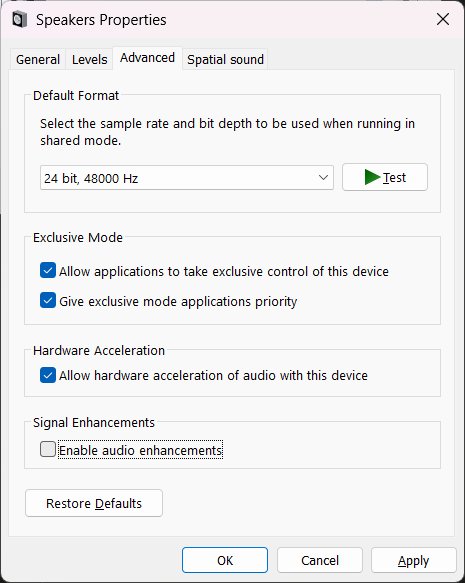
Windows applies signal processing effects: EQ, room correction, bass boost and loudness equalisation, on top of audio output. Each effect adds buffer latency inside the Windows audio stack. Disabling all of them is the single most impactful setting change you can make. This is documented in SimHub's own official wiki as a required step.
Apply and OK. If the Enhancements tab is missing entirely, your driver has already stripped them out, so move on to the next step.
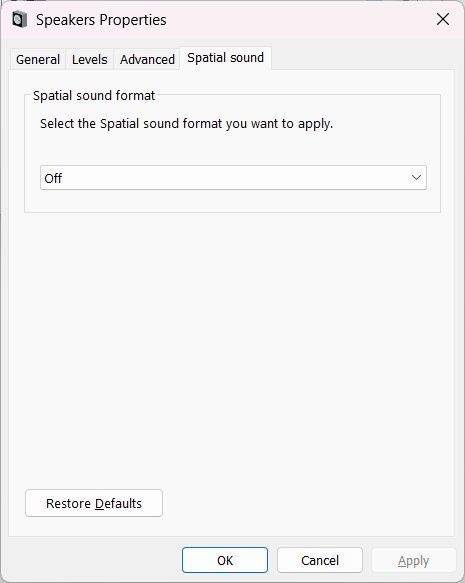
Windows Sonic, Dolby Atmos for Headphones, DTS:X Ultra. These are spatial audio systems that intercept the audio stream and apply 3D processing before it reaches the hardware. Even when enabled "passively", they add processing overhead. Your shaker output device should have this set to Off.
Realtek's manufacturer drivers bundle additional audio processing objects (APOs) that run inside the Windows audio stack even with enhancements turned off. Microsoft's generic "High Definition Audio Device" driver strips all of that out. Community testing consistently reports a significant improvement with this change alone.
Windows will warn you the driver isn't recommended, but proceed anyway. It's a first-party Microsoft driver and guaranteed to work. Note: Windows Update may push Realtek drivers back after major updates. If your latency worsens after an update, check this first.
Dolby Access, DTS Sound Unbound, Waves MaxxAudio, Nahimic, Sonic Studio, and ASUS Sonic. These applications install audio processing layers that run permanently in the Windows audio pipeline, regardless of whether the apps are open. They are commonly bundled on Dell, ASUS, HP, and Lenovo systems and often not obvious until you look.
Restart after uninstalling, then re-test your shaker latency before continuing.
SimHub processes telemetry for every enabled game simultaneously and runs all loaded plugins in parallel. This overhead adds to the delay between data arriving and effects firing. Disable everything you don't actively use.
Restart SimHub after changing this.
ShakeIt exposes audio buffer settings per device. Reducing the buffer size trims latency at the margins and won't eliminate the WASAPI floor, but every bit helps. If you hear crackling after reducing it, step it back up if your hardware or CPU can't sustain the smaller buffer.
Available since SimHub 7.4.3. If you don't see the Advanced Output Options, update SimHub first.
Working through all six steps above can genuinely recover 80–130ms of latency. For pure immersion, that may be enough. But there's a hard floor you cannot get below with SimHub, and it's architectural, not a settings problem.
SimHub's ShakeIt plugin generates audio through FMOD (visible in its own error logs) and routes it through Windows WASAPI in shared mode. In shared mode, Windows mixes all audio streams together before sending output to hardware, and that mixing process has an unavoidable latency floor of around 20ms regardless of buffer settings. No SimHub setting can bypass this because it's a Windows audio architecture constraint, not a SimHub bug.
SimHub's feature request thread asking for ASIO support has been open for years. Users have measured 140–200ms end-to-end across many sound cards. The SimHub developer acknowledges the WASAPI floor. This is a known, unfixed architectural limitation. The only way past it is software that uses ASIO from the ground up.
After steps 1–6 above, most users still measure 100ms+ end-to-end, consistent with what's widely reported in SimHub forums. That's a real improvement over the out-of-box experience, but at 150 km/h it still puts you several metres past the moment before feeling a kerb strike. Usable for immersion; not precise enough to act on as a driving cue.
Most haptic software starts as a general-purpose tool and adds bass shaker support later. Track Impulse was built the other way around. Latency was the design constraint everything else was built around. That shapes every layer of how it works.
Rather than polling game telemetry on a timer like SimHub's 60Hz loop, TI uses event-driven shared memory reading, waking the instant the sim writes new data. On the output side, TI supports ASIO for the lowest possible audio latency, but critically, even on a standard sound card with no ASIO driver, TI achieves latency that standard haptic software can't reach.
On a standard sound card using WDM-KS output, Track Impulse on ACC delivers 12–19ms end-to-end. SimHub users are still sitting at 100ms+ even after every driver fix and settings tweak — TI gets well under that on hardware you already own, with no driver changes needed. Add an ASIO interface and ACC drops to 2–9ms.
At 150 km/h, 9ms puts you 37 centimetres past the moment. Even at 19ms, on a standard sound card with no extra hardware, you're under 80 centimetres. Compare that to 100ms+ after every SimHub fix, which is still over 4 metres of travel before you feel anything.
Any audio interface with a native ASIO driver will get you there. ASIO4ALL also works with most existing sound cards for free if you want to try it before investing in new hardware. See the full interface guide →
Because SimHub routes audio through WASAPI shared mode, which has an unavoidable ~20ms floor that no setting can remove. The six-step guide above can recover 80–130ms of the total, but you can't eliminate the WASAPI floor without switching to software that uses ASIO natively.
Driver reinstalls fix part of the problem — removing Realtek's built-in audio processing can recover a meaningful chunk of latency — but the remainder comes from the software's WASAPI audio pipeline. You need software that uses ASIO output to eliminate that layer entirely.
It removes routing conflicts and can improve stability, but the same software buffers and WASAPI overhead still apply. You'll still measure 40ms+ with SimHub on a dedicated card even after all other fixes.
ASIO4ALL is a wrapper that gives ASIO-style access to standard Windows audio devices. It's better than WASAPI shared mode, but native ASIO drivers from the interface manufacturer are lower latency and more stable for continuous haptic use.
Yes. Use a separate audio interface for your shakers. ASIO exclusively claims that device, while your main speakers or headset run through a different output via standard Windows audio.
2–9ms on ACC at 144fps, or 5–19ms on iRacing, with a native ASIO interface at 64 samples / 48kHz. The range reflects real-world variation in sim telemetry delivery timing. Audio output latency at those settings is 1.3ms.
Free during beta. No credit card required. 2–9ms on ACC · 5–19ms on iRacing, fast enough to use as a real driving aid, not just a novelty.